

LinkedIn groups are an often overlooked but very effective tool for relationship building, networking and generating quality leads. If you know how to use them properly, they can become an invaluable part of your B2B strategy, and your SSI index will thank you. In this article, we’ll show you how LinkedIn groups work, how to appear professional in them, and how to get relevant business leads from them.
How LinkedIn Groups work
LinkedIn Groups are themed communities within the platform itself. Their purpose is to share know-how, discuss current trends and connect people with the same professional interests.
There are two main variants – public and closed groups. Anyone can join the public ones, but for the closed ones you have to apply for admission first.
Most good groups have moderators, rules of conduct, and regularly approve new posts. This helps maintain the quality of the content and a safe environment for communication.
Where to connect? Use the checklist to help you choose the right group
Not every group will make sense for you. When choosing, focus on quality, not quantity. At GetLeads, we’ve created a short checklistthat we recommend you follow before joining a group.
- Is the group active? – Follow the frequency of posts and comments
- Are the members from your industry or target group?
- Do experts contribute to the group or is it overwhelmed with spam?
- Are the rules set up to encourage discussion, not just promotion?
- Contributor profiles are real and do not look suspicious
Get Leads recommendation: it is better to be an active member of 3-5 relevant groups than an invisible member of 50. So choose carefully according to your focus and level of seniority.
You are a member. What now? Join the discussion and gain the trust of others!
In groups, it’s not about “selling something”, it’s about being seen as someone who has something to offer. Share your experiences, comment on others’ posts, answer questions. You build authority and naturally attract attention – and thus potential leads.
We have 4 recommendations to get you started:
- Engage in discussions instead of writing about the services you offer
- Create valuable content that helps others (tutorials, insights from practice)
- Get advice – Have you encountered a problem you don’t know how to solve? Get advice from your colleagues in the group
- Tell stories – Did something interesting happen to you at work? How did you get there?
- “What do you think?” – Ask questions and provoke discussions yourself. You’ll have more reach
Want to know more about how to improve your SSI index and increase your chances of closing deals? We’ve put together an e-book with a checklist to help you best optimize your profile.
How do I search for groups on LinkedIn?
Use the classic search bar to find your LinkedIn group. Enter a keyword related to the group you are looking for, e.g. B2B marketing, HR, digital marketing and search. In the menu below the bar, use the filter to view only the groups.
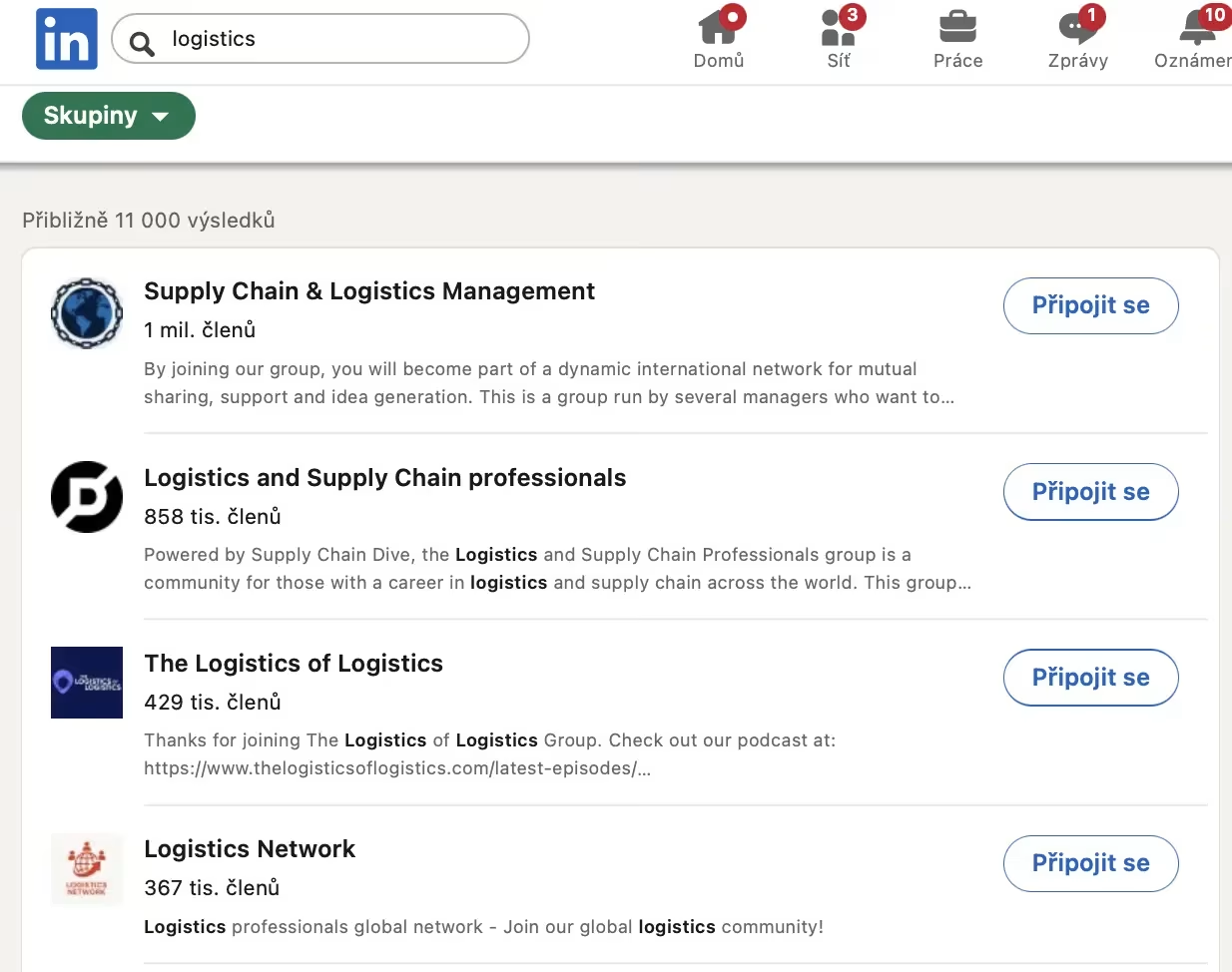
When making your selection, look in particular at the following criteria:
- Number of members – groups that have 500+ members are ideal.
- Frequency of posts – not all groups are as active
- Language – here you should be guided by your target customers
- Quality of discussions – review the last few posts to make sure they are not spam and the comments make sense
Want to learn how LinkedIn works and what opportunities it brings to the business world? Sign up for our LinkedIn training, master digital business skills and achieve your goals.
Getting leads through LinkedIn Groups
If you can be seen and trusted in a group, people will start coming to you. V LinkedIn groups are a natural context for new business opportunities. But how do you turn a comment into a lead?
Such contact is often much more effective than direct cold outreach. In addition, you also increase your SSIbecause the platform starts to see you as a relevant player in the industry.
Start your own group and build a community
If there is a lack of a quality group in your industry, maybe it’s time to start one. It’s a great way to put yourself in a leadership role and build a community around you. You’ll gain regular access to your target audience, , the ability to set rules, topics and communication style, and most importantly a natural space to share your content.
How do I start a LinkedIn group?
In the top bar on the right, click on the “For Business” button and under the “My Apps” heading, click on “Groups”. You will see all the groups you are a member of. You will also see a “Create Group” button on the top right. When you click on it, you will be taken to a form to fill in the group.
Make sure you pay attention to the following points
- The name of the group should be clear and concise. E.g. Freelance copywriters
- Rules – Clearly state what is and is not allowed. Most often this is a ban on spam, and repetitive posts. Know-how sharing or networking is usually welcome
- Visibility – Do you want everyone to be able to join your group, or do you want to control the number of members? Decide between a private or public group?
LinkedIn Groups as an unobtrusive but powerful tool
LinkedIn groups are not about quick conversions, but about relationships and trust. They are similar in this to SEO, which we’ve already written about in this article. If you go about them strategically, you’ll start to collect leads organically, without aggressive selling. If you are seen as the one helping and bringing value, the business opportunities will come on their own. Plus, you’ll also improve your SSI index, which affects the visibility of your profile in the network.
Start with your profile and strategy. Check out our service Personal Brand by Get Leadsto help you stand out from the crowd, earn trust – and most importantly, new leads. Or download our checklist for building your SSI index and see where you have room for improvement.