
Today, a LinkedIn profile doesn’t just serve as a digital CV. It has become an important tool for establishing new professional relationships, strengthening your personal brand and finding business opportunities. Yet many users don’t take full advantage of one feature that has tremendous potential: the overview of who has viewed my LinkedIn profile. Did you know you can actively use this feature to make new connections and build relationships?
Article content
- Where to find out who has viewed your LinkedIn profile
- Differences between the free and premium versions
- What this feature tells you and why it matters
- How do I respond to your profile display?
- Turn profile visits into new opportunities
- How to edit your LinkedIn profile to make it engaging
- Watch who watches you – and build relationships
Where to find out who has viewed your LinkedIn profile
Accessing this feature is simple. On your computer, you can access your statistics via the main profile page, where you will see “Who has viewed your profile” in the right-hand column. On the mobile app, you’ll find a similar overview in the “Me” section or directly in notifications.
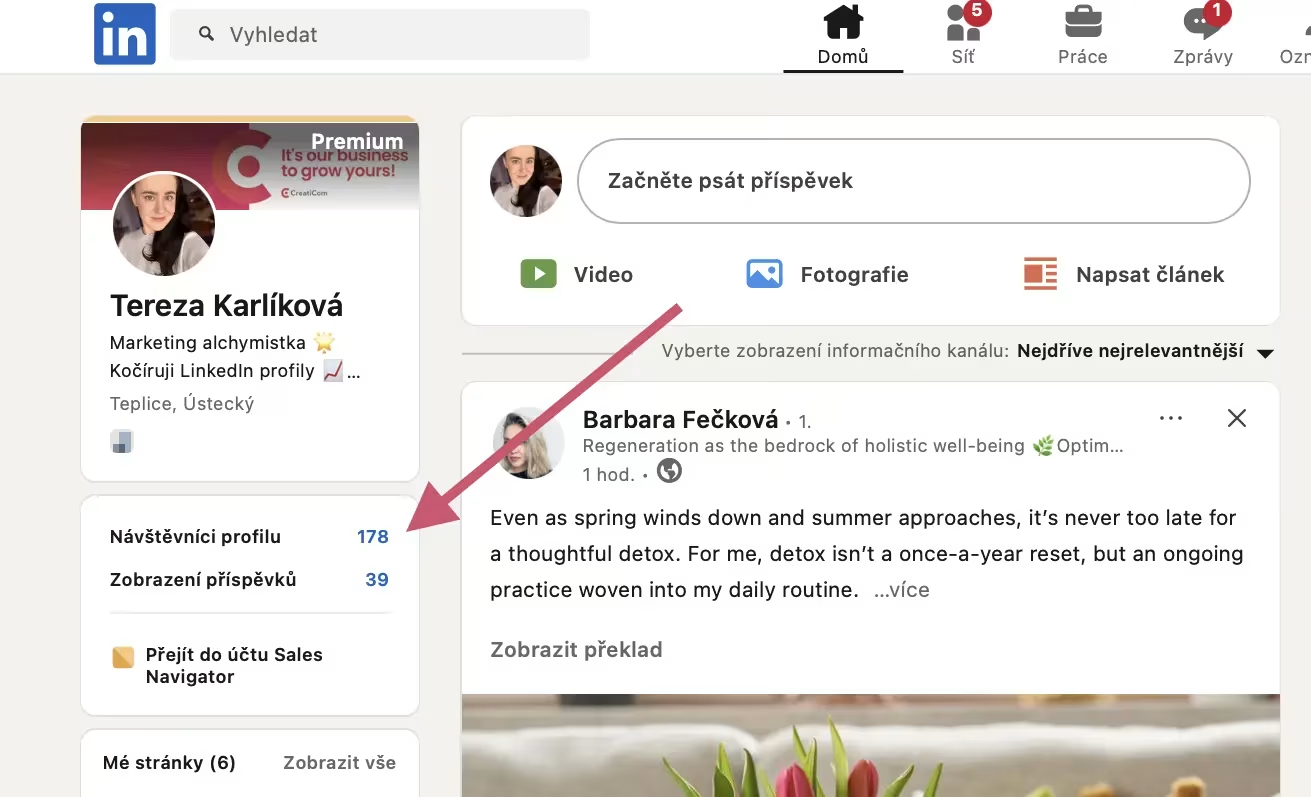
Basic LinkedIn profile however, will only show you a limited number of recent visitors and will not show you the names of anonymous users. To fully use this feature, you need to have a premium version – for example, certain versions of LinkedIn Premium offer a complete visitor overview for up to 90 days.
Differences between the free and premium versions
Free LinkedIn profile provides only limited information – for example, the name, company and profession of the last few visitors (unless they are in anonymous mode). In contrast, premium version allows you to see your entire visit history for the last three months, including detailed data and analytics.
What can the premium version be used for?
This information is useful, for example, if you are looking for new job opportunities, new clients or building your network of professional contacts. LinkedIn’ s Who Viewed My Profile feature can serve as a starting point for you to effectively reach out to people who have already shown some interest in you.
Want to learn how LinkedIn works and what opportunities it brings to the business world? Sign up for our LinkedIn training, master digital business skills and achieve your goals.
What this feature tells you and why it matters
The visitor survey is not just about curiosity – quite the opposite. It’s a great tool for understanding who’s following you, why and what they’re looking for. Typically, you’ll come across three types of people:
- Recruiters looking for candidates for specific positions.
- Potential clients or business partners.
- Colleagues in the industry who want to follow what you’re doing.
However, you should be warned if your LinkedIn profile has caught the eye of someone at the company you want to work with. This is an ideal opportunity to make contact. This could be a potential client who has shown interest just by clicking on your profile repeatedly.
How do I respond to your profile display?
If someone has viewed your LinkedIn profile, don’t be afraid to take the first step. Feel free to send that person an invitation to connect with a short message. Here are a few ways to break the ice, so to speak:
- “Hello, I noticed you visited my profile – I would like to connect with you.”
- “Thanks for visiting my profile. If you’re interested in anything, I’d be happy to chat.”
- “Hello, I see you have visited my profile – if you are interested in anything, I would be happy to hear from you.”
- “Good day, thank you for visiting my profile. If you are interested in some of my work, let’s connect.”
Alternatively, you can be even more personal and offer a casual conversation if, for example, you share a similar field, interests or work in the same region.
However, it is important that the first contact does not act as an unsolicited advertisement. Avoid aggressive selling in the initial message. It’s much more effective to build trust and share value – perhaps in the form of interesting content or a recommendation.
Want to know more about how to improve your SSI index and increase your chances of closing deals? We’ve put together an e-book with a checklist to help you best optimize your profile.
Turn profile visits into new opportunities
LinkedIn’ s Who Viewed My Profile feature is literally a treasure if you know how to use it properly. Every visit to your profile can be the start of a new business collaboration or contract. Just start seeing profile views as an opportunity for conversation.
Reach out to visitors, thank them for their interest, offer to share experiences or information, and naturally build relationships. In addition, you can use the information you find to build your personal brand in a more targeted way. If you’re frequently viewed by people in a particular industry, tailor your content accordingly and write posts, comments or articles that will be of interest to these visitors.
How to edit your LinkedIn profile to make it engaging
In order for visitors to stay longer on your profile and decide to contact you, you need to give them a reason. A professional and well-structured LinkedIn profile is essential. If you’re interested in this topic, we’ve covered it thoroughly in the article Optimizing your LinkedIn profile: Tips for Czech Professionals.
But in short, the focus is on these elements of a LinkedIn profile:
- Headline and introduction section: clearly state who you are, what you do and how you help others.
- Profile photo and banner: the visual first impression is decisive.
- About me: write humanly, concisely and factually. Provide a call to action – for example, an invitation to connect.
- Experience and skills: don’t forget about results, numbers and achievements.
- Additional sections:Insert links to the website, case studies, articles or presentations.
A well set up LinkedIn profile will position you in search results, attract attention and increase the chances of relevant visits.
Watch who watches you – and build relationships
At first glance, the who viewed my LinkedIn profile feature may seem inconspicuous. Don’t treat viewing your profile as a coincidence, but as an opportunity. Anyone who views you could be a potential client or business partner. Respond, offer a connection, make yourself known – and above all, build relationships that matter.
Do you want from LinkedIn profile to get new leads? Knowing who has viewed your LinkedIn profile is just the beginning. With us, you can turn passive visitors into real customers. V Get Leads.cz will help you set up a profile that sells, reach your target contacts in an automated way and build meaningful B2B relationships.